
Unzipper.app: The Online Zip Tool
This article provides a comprehensive overview of Unzipper.app, an innovative web-based platform that allows users to create, open, and edit ZIP archives directly from their internet browsers. Throughout the following sections, we will explore the core functionalities of the application, including its file creation capabilities, editing tools, and extraction processes. We will also examine the distinct advantages of utilizing an online unzipper compared to traditional desktop software, such as cross-platform compatibility, enhanced accessibility, and the elimination of software installation requirements. Finally, we will delve into the security features, technical specifications like the 2.15 GB file limit, and various real-world use cases to demonstrate how this utility simplifies digital file management for students, professionals, and casual internet users alike.
The digital landscape is continuously evolving, and the way we handle data is shifting from localized desktop environments to versatile cloud-based and browser-based solutions. The history of file compression dates back to the early days of personal computing, when hard drive space was incredibly limited and expensive, and data transfer speeds over dial-up modems were agonizingly slow. In those days, compressing a file was not just a convenience; it was often a strict necessity to fit data onto physical floppy disks or to send an email attachment before a network connection timed out. The ZIP format, introduced in the late 1980s, revolutionized this process by providing a reliable standard for data compression. Decades later, while our local hard drives measure in terabytes and our internet connection speeds in gigabits, the fundamental utility of the ZIP file remains unchanged. We still need to group multiple files together for organization, and we still benefit immensely from smaller file sizes. What has changed, however, is the methodology we use to interact with these files. Platforms like https://unzipper.app have emerged to modernize this foundational computing task, bridging the gap between a legacy format and the modern, browser-centric way we use technology today.
Understanding what an unzipper actually is forms the foundation of appreciating this platform's value. At its core, an unzipper, often referred to as a file archiver or extraction tool, is software designed specifically to open and unpack compressed files. When you unzip a file, you are essentially restoring the compressed data to its original, full-sized state, allowing you to view and interact with the documents, images, videos, or executable programs contained within the archive. Conversely, a zipping tool compresses these standalone files to save space and organize them logically. Unzipper.app serves both of these vital functions flawlessly, acting as a two-way street for data compression and extraction without binding the user to a specific operating system, hardware ecosystem, or paid software subscription.
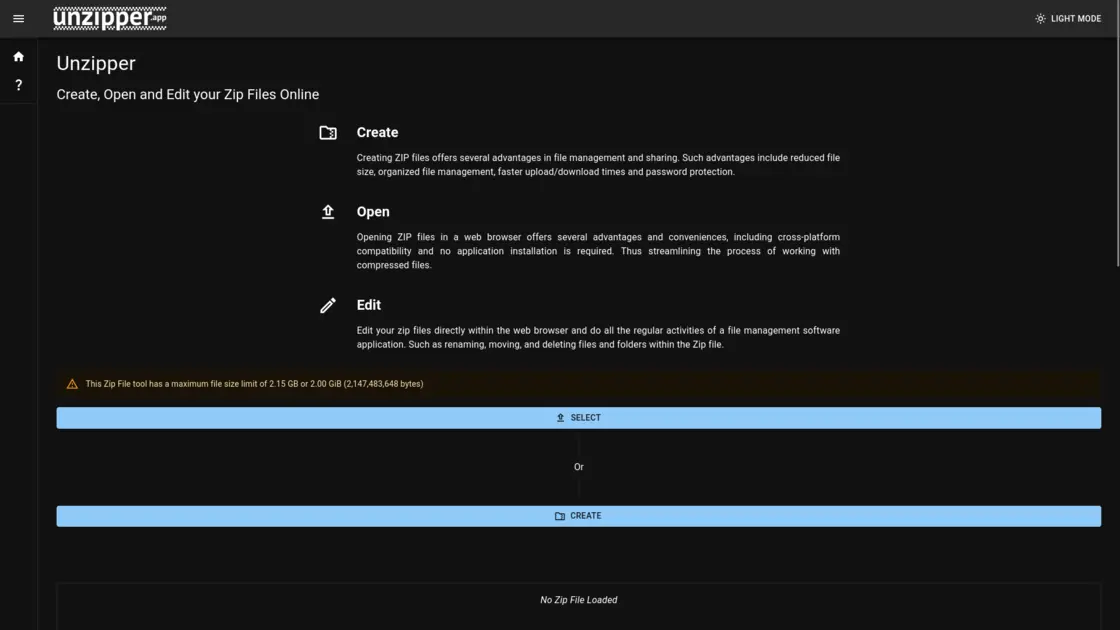
One of the primary pillars of Unzipper.app is its intuitive archive creation functionality. Creating ZIP files offers numerous distinct advantages in daily digital tasks. By compressing files, users significantly reduce the overall footprint of their data, which is crucial for saving storage space on local hard drives and limited cloud storage accounts. Furthermore, bundling multiple documents into a single ZIP file streamlines file management and digital sharing. Instead of attaching twenty individual high-resolution images or text documents to an email, a user can consolidate them into one neatly organized package. This not only makes the email cleaner and less confusing for the recipient but also results in significantly faster upload and download times due to the highly reduced file size. Within the Unzipper.app interface, users can create these archives effortlessly, adding files and folders just as they would in a traditional native desktop environment.
In addition to simple file creation, Unzipper.app offers sophisticated internal management and editing tools. It is not merely a basic utility for packing and unpacking; it functions as a full-fledged file manager for your archives. Users can edit their zip files directly within the web browser. This means you can perform regular file management activities without ever needing to extract the contents to your local drive first. If you need to rename a specific document inside a massive archive, you can do so directly on the site. If you want to move files between different nested folders within the ZIP, or delete unnecessary files to reduce the archive's size even further, Unzipper.app provides the necessary interface to accomplish this. You can even attach text comments to specific files, adding an extra layer of organization and vital context for anyone who might receive the archive at a later date.
Opening ZIP files is equally streamlined and efficient. The traditional, old-school method involves downloading a ZIP file from the internet, locating it deep in your downloads folder, right-clicking it, and waiting for a bulky desktop application to launch and extract the contents. Unzipper.app completely bypasses this localized friction. Opening ZIP files entirely in a web browser offers unparalleled convenience. Because the processing is handled through the web interface, it guarantees total cross-platform compatibility. Whether you are using a Windows PC, a macOS Apple device, a Linux distribution, or even a lightweight ChromeOS Chromebook, the experience remains consistent, fast, and highly reliable. You do not have to worry about whether your specific operating system has native support for certain archive types or if your trial period for a third-party software suite has expired.
The complete elimination of application installation is perhaps the most significant overall benefit for the average user. Downloading and installing software can be a tedious process fraught with potential security issues and system slowdowns. Users often have to navigate confusing download pages, carefully avoid accidentally installing bundled adware or bloatware, and ensure they have the necessary administrative privileges on their machine just to install new applications. In enterprise, corporate, or educational environments, installing unapproved software is often entirely blocked by IT administrators for strict network security reasons. Unzipper.app effortlessly bypasses all these common hurdles. Since the entire application runs actively in your web browser, there is zero installation required. You simply navigate to the website URL, upload your target file, and begin working immediately. This on-demand accessibility is an absolute game-changer for users on restricted networks, shared public computers, or borrowed devices.
Security is naturally a paramount concern when handling personal, financial, or professional data online. Unzipper.app actively addresses this reality by incorporating robust security measures directly into its core feature set. When creating ZIP archives, users are given the option to highly secure and password-protect their files using AES (Advanced Encryption Standard). AES is a globally recognized, military-grade encryption specification established by the U.S. National Institute of Standards and Technology, and it is widely relied upon worldwide to secure highly sensitive digital data. By applying AES encryption through Unzipper.app, users can rest assured that even if their archive is intercepted or falls into the wrong hands, the contents will remain completely inaccessible without the correct passphrase. This high level of security is absolutely essential for transmitting confidential business contracts, personal medical records, or any other private information over the open internet.
Accessibility also extends well beyond just traditional desktop computers. In today's heavily mobile-first world, users frequently need to handle, view, and send files directly from their smartphones and tablets. Mobile operating systems historically have clumsy, limited, or completely non-existent native support for complex file archives. Unzipper.app elegantly solves this modern problem by being fully accessible from any smart device equipped with an internet connection and a standard web browser. Whether you are commuting on a train using an iPhone, resting in a cafe with an Android tablet, or working at a hotel desk with a laptop, the platform intelligently scales to perfectly fit your screen size and provides full, uncompromised functionality. This means you can receive an urgent, zipped project folder via email on your phone, open Unzipper.app, quickly extract the one specific PDF document you need to read right now, and continue with your day without impatiently waiting to get back to a traditional computer.
While the tool is incredibly powerful and versatile, it is also important for users to understand its practical technical parameters. To ensure smooth, fast operation and maintain reliable server stability for everyone globally, Unzipper.app imposes a maximum file size limit. Users can easily process files up to 2.15 GB or 2.00 GiB (which equates to exactly 2,147,483,648 bytes). For the vast majority of everyday digital tasks—such as sharing text documents, high-resolution photos, massive spreadsheets, and short video clips—this limit is more than generous. It comfortably accommodates the daily needs of university students submitting coursework, remote freelancers sending completed project files to international clients, and families sharing large holiday photo albums. Users handling truly massive data dumps, raw uncompressed 4K video editing files, or entire system hard drive backups may still need to rely on localized hardware software, but for typical internet-based file sharing, the 2.15 GB threshold is perfectly adequate and highly functional.
Navigating the visual interface of Unzipper.app is designed to be as user-friendly and highly intuitive as possible, specifically catering to individuals who may not consider themselves technically savvy or experienced with file management protocols. When a user first lands on the homepage, they are immediately greeted by a clean, minimalist design completely devoid of cluttered menus, intrusive advertisements, or confusing technical jargon. A prominent central upload area clearly indicates exactly where a user needs to drag and drop their ZIP file or click to manually browse their local storage directory. This sharp focus on user experience ensures that the friction normally associated with file extraction is completely eliminated. Furthermore, the website features a highly requested dark mode toggle, catering directly to users who prefer a darker visual aesthetic to significantly reduce eye strain during prolonged screen time or when working late into the night in low-light environments. This careful attention to accessibility and user comfort highlights the developers' clear commitment to creating a tool that is not only highly functional but also genuinely pleasant to use on a daily basis.
The practical real-world applications of Unzipper.app are vast, varied, and impactful across numerous demographics. For students and classroom educators, it provides a lightning-fast way to bundle complex assignments, grade rubrics, or distribute large digital course materials without ever worrying about software compatibility issues across hundreds of different student devices. Freelancers and creative professionals, such as digital graphic designers, software coders, or copywriters, can leverage it to neatly package their final deliverables, complete with AES password protection to definitively ensure client confidentiality and secure their intellectual property before final invoices are paid. Even casual, everyday internet users benefit greatly from the simple ability to quickly download and carefully inspect the contents of a questionable ZIP file found online without permanently cluttering their hard drives with temporary extraction folders or risking the immediate execution of a malicious file.
The rapid rise and widespread adoption of applications exactly like Unzipper.app directly signifies a much broader, permanent trend in global software development and user preference. The tech industry is steadily moving away from heavy, resource-intensive, localized applications that demand constant updates and deep system integration, moving toward nimble, cloud-integrated web applications that live entirely in the browser. These lightweight tools actively democratize access to essential computing functions, ensuring that absolutely anyone with a basic web browser and an internet connection can perform complex technical tasks safely, securely, and efficiently. By expertly combining intuitive minimalist design, robust military-grade encryption, comprehensive internal file management capabilities, and universal mobile-friendly accessibility, Unzipper.app easily stands out as a premier, top-tier solution for handling compressed files in the modern digital era. It successfully transforms what was historically a tedious, time-consuming administrative computer task into a remarkably seamless, totally frictionless experience, proving definitively that sometimes the absolute best software is the kind you never actually have to install at all.